


Whatnot: Shop, Sell, Connect
4.723.52K Reviews
App Specs
- Version
- Varies with Device
- Updated On
- License
- Free
- Downloads
- 10,000,000+
- Developer
- Whatnot Inc.
- Categories
- Shopping
- Platform
- Android, iOS
Screenshots

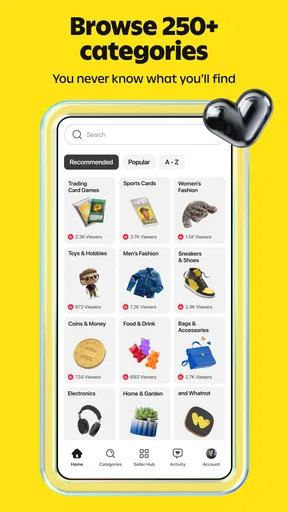



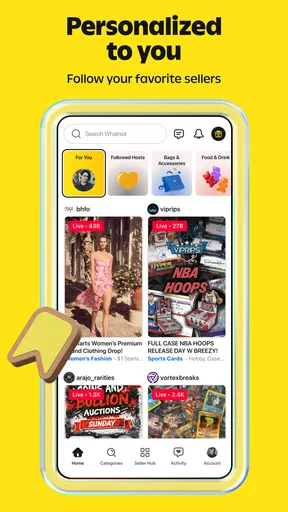
 Analysis by AppCompare
I see Whatnot as a shopping app for people who enjoy the hunt as much as the purchase. Instead of browsing a quiet grid of products, you can discover items through live seller shows, watch them presented in real time, and take part in a marketplace that feels social and fast-moving. That makes it more engaging than ordinary online shopping when you want to explore a hobby, but less convenient when you already know exactly what you need and simply want the quickest checkout.
Whatnot is a free shopping app from Whatnot Inc., and its focus on live selling shapes nearly every part of the experience. It has a 4.7 average from around 322,000 ratings, with over 10 million installs. Those figures suggest that the format has found a sizable audience, though popularity alone does not make live commerce a fit for every shopper. The app is rated Mature 17+, so it is intended for adults rather than younger users.
Shopping becomes a live event
The clearest strength is the way a live show can make an unfamiliar item easier to assess than a static listing. A seller can hold it up, talk through its details, and respond to questions while viewers watch. For collectibles and other enthusiast goods, that presentation can add useful context: you are not just seeing a product image, but watching someone discuss the object and its appeal.
I find that especially useful when I am browsing rather than shopping with a fixed list. A live stream can introduce a category, seller, or item I would not have searched for on a conventional marketplace. The trade-off is that discovery takes time. A show may be entertaining and informative without having the exact item you want, so this works best when browsing is part of the pleasure rather than a detour from a quick errand.
The social element also changes the pace. Questions and conversation can help viewers understand what is being offered, and the stream gives a sense of activity that a product page cannot reproduce. But live shopping is not automatically a better way to judge quality. The camera angle, lighting, and speed of a presentation can leave details unclear. If condition or exact specifications matter, I would pause to ask rather than assume that a lively demonstration answers everything.
The best reason to try Whatnot is the combination of discovery and real-time presentation, not a promise that every listing will be a bargain. I would treat each show as a chance to learn about an item and its seller, then make a deliberate choice. That mindset makes the experience more rewarding and helps keep the excitement of a live sale from becoming the only reason to buy.
Useful when you are exploring a hobby
For someone who collects, follows niche interests, or likes seeing items discussed by people who sell them, the format has a natural advantage. A collector can spend a short stretch watching a relevant show, notice how an item is described, and decide whether it merits closer attention. That can be more revealing than scrolling through listings that give little sense of the seller’s knowledge or enthusiasm.
Worth Reading Before You Choose

Flipboard Shows What News Apps Must Do Beyond the Feed

Switching to Android Auto Means Rethinking Your Driving Routine

Google Calendar Makes a Crowded Week Easier to Manage

Ludo King Makes the Most of the Minutes Between Plans

Baby Panda World Brings Quick Play to Modern Phones, but Its Game Library Feels Busy

ESPN’s Live Game View Makes Following Close Games Easier
A practical approach is to decide what you are looking for before joining a stream. For example, if you are browsing for a particular kind of collectible, set a limit for what you are willing to spend and what details you need to verify. Then use the live presentation to ask focused questions. This gives you the benefits of the format without letting a fast-moving show turn casual interest into an impulsive purchase.
Another useful habit is to separate entertainment from shopping. A seller may be engaging, and a show may be fun to watch even when nothing suits your needs. I would not count time spent watching as evidence that a purchase is worthwhile. If the item is not right, leaving empty-handed is a perfectly good outcome; the app’s value can be the discovery and conversation, not only the transaction.
Where the live format asks more of you
The main limitation is time. Traditional marketplaces let me search for an item, compare several listings, and return to the decision later. A live show asks me to pay attention while it is happening. If I am busy, browsing in short bursts, or shopping during a quiet moment with no desire to watch video, the format can feel like friction rather than an upgrade.
There is also a meaningful difference between seeing an item live and having a complete, easy-to-compare record of it. A stream can show details from one angle, but viewers may need to ask for close-ups or clarification. That is a reasonable exchange for the immediacy of live selling, but it means the app may not suit buyers who prefer careful side-by-side comparisons before committing.
Speed is another factor to manage. The energy of a live sale can make decisions feel urgent, even when taking time to think would be wiser. I recommend setting a personal spending ceiling before entering a show and sticking to it. If you are unsure about an item, a moment of enthusiasm is not a substitute for checking the details that matter to you. That advice is particularly important for higher-value purchases or items where condition affects the appeal.
Whatnot is also not my first choice for routine household shopping. If I need a specific everyday product and care most about finding it quickly, a conventional online store or a searchable marketplace is usually more direct. Whatnot’s distinctive strength is the experience of watching items presented and discovering what is available, not reducing every shopping task to the fewest possible steps.
Who is likely to enjoy it
I would recommend trying it if you like collecting, enjoy seller-led demonstrations, or are curious about shopping as a live social activity. It is especially appealing to people who are comfortable browsing without a precise destination and who value hearing a seller explain an item. The experience can also suit someone who wants to learn what to look for in a niche category by watching how products are discussed.
It is less suited to shoppers who dislike video, have limited time, or want a simple catalogue with predictable search-and-compare browsing. People who find live selling pressure uncomfortable should be cautious too. There is nothing wrong with preferring a slower, more methodical purchase, and another marketplace may provide a better fit when you want to inspect listings at your own pace.
For a realistic everyday use, imagine having a free evening and an interest in a particular collecting niche, but no urgent need to buy. I would open Whatnot, find a relevant live show, and watch long enough to see whether the seller’s presentation is useful. If an item catches my attention, I would ask about the details that matter, compare the offer with my own expectations, and only proceed if it still makes sense after the initial excitement passes. If nothing fits, I would close the app without treating the session as a failure.
That kind of low-pressure browsing is where the app makes the most sense. It turns spare time into a chance to discover items and hear them discussed, while still leaving the buyer responsible for deciding whether a purchase is worthwhile. The format rewards curiosity, but a little preparation helps keep it enjoyable rather than distracting.
A different kind of marketplace
Compared with a standard shopping app, Whatnot puts more emphasis on the seller’s live presentation and less on browsing a static catalogue alone. That can make products feel more vivid and give buyers a chance to ask questions in context. The reverse is that a stream is not as easy to skim as a page of listings. Someone who wants to compare options rapidly may prefer a traditional marketplace; someone who likes discovery and interaction may find the live format more human.
It also differs from watching shopping content purely for entertainment because the viewing is connected to an active marketplace. That blend is compelling, but it calls for clear boundaries: decide whether you are there to watch, learn, or buy. I find that naming the purpose beforehand helps. If I am only curious, I can enjoy a show without feeling obliged to purchase; if I am shopping, I can focus on questions and value rather than the performance of the stream.
The app first appeared on December 6, 2019, and its identity remains closely tied to live commerce. That focus is both its appeal and its constraint. It does not need to replace every other way of shopping to be useful. For the right person, a live seller can make browsing more informative and enjoyable; for someone who wants a fast, quiet transaction, the same feature can get in the way.
My verdict
I would describe Whatnot as a focused alternative to ordinary online shopping, not a universal replacement for it. Its strongest moments come when a live presentation helps me discover an item, understand why it interests a community, or ask a question before deciding. Its weakest moments come when I need a fast answer, a broad comparison, or a calm environment in which to weigh options without the pace of a live show.
If you enjoy collectibles, niche products, and seller interaction, I think it is worth trying as a browsing destination. Go in with a spending limit, ask direct questions when a detail matters, and give yourself permission to leave without buying. If you mainly want a quick, predictable way to purchase everyday goods, I would choose a conventional shopping app instead. Whatnot is at its best when curiosity leads and impulse stays in check.
Making a live show work for a real purchase
When I am considering a particular item, I treat the stream as a first look rather than the whole decision. Before entering, I decide which facts would change my mind: condition, completeness, visible wear, or whether the item matches the version I have in mind. Asking about one or two specific points is more useful than asking broadly whether something is “good.” If the seller cannot show the detail clearly in the moment, I would rather wait than fill in the gaps myself.
It also helps to keep a short note of the item and the questions I still have, especially if I am watching several shows around the same interest. Live presentations can blur together, and remembering which seller showed which detail is harder than comparing saved product pages. I use the stream to narrow my interest, then rely on a calmer second thought before making a commitment. This small pause is particularly valuable when I started browsing for entertainment rather than with a planned purchase.
For sellers, the same live format can be more demanding than posting listings. A clear camera view and concise explanation matter because viewers have to understand the item as it is being presented. As a buyer, I would not interpret a confident presentation as proof of condition or value; I would still ask for the evidence I need. The interaction is useful precisely because it gives room for questions, but it cannot remove the need for judgment.
What to expect before you start browsing
A common question is whether I need to arrive with a specific item in mind. I do not think so: browsing works well when I have a category or collecting interest to guide me, even if I am open to surprises. With no topic at all, though, the stream-based format can become a long succession of choices without a clear reason to stay. A loose theme makes discovery feel purposeful without turning the session into a rigid search.
Another practical question is whether a live presentation means I can judge an item completely. It can help me see and hear more than a still image often conveys, but it is not a guarantee of a full inspection. I would ask for a closer look at anything important and remain cautious if the available view does not answer my question. For a purchase where a tiny flaw or exact specification is decisive, a detailed listing or in-person inspection may be a better route.
People who are new to live selling may wonder how to avoid feeling pushed to act. My approach is to set a budget before a show, decide whether I am browsing or buying, and leave if I cannot get comfortable with the details. Those are not complicated rules, but they counter the format’s urgency. If watching itself feels stressful, there is little reason to force it; a slower marketplace is a better match than trying to adapt to a pace you do not enjoy.
I would also keep expectations realistic about what makes a good session. A useful visit might end with a question answered or a better sense of what to look for, not a purchase. That matters for collectors who are learning a category and for anyone who wants live discovery without turning every evening into a shopping mission. Treating attention as part of the experience, rather than measuring success by what goes into a cart, helps preserve the app’s more enjoyable side.
For shoppers deciding between Whatnot and a conventional marketplace, I would make the choice based on the job at hand. If I need to locate a specific household item, compare several sellers efficiently, or return to an option after thinking it over, searchable listings are the better tool. If I want a seller to demonstrate an enthusiast item and I am happy to spend time watching, Whatnot offers a more conversational route. It is not simply a faster or slower version of the same experience; it asks for a different kind of attention.
That distinction is the reason I would keep it as a complement rather than a replacement. I can use ordinary shopping apps for planned errands and open Whatnot when I have time to explore a collecting interest. Keeping those purposes separate makes the app’s strengths easier to appreciate and reduces the chance that a lively show will distract me from a practical purchase I could complete more simply elsewhere.
Pros
- Live auctions let you inspect items and ask sellers questions in real time.
- A broad range of collectibles makes it easy to browse niche categories.
- Following sellers and shows helps you keep up with upcoming sales.
- In-app payments and order tracking make purchases convenient.
- Live selling tools give sellers a direct way to reach interested buyers.
Cons
- Fast-paced auctions can make it easy to bid more than you intended.
- Item condition and authenticity depend on the individual seller.
- Shipping costs and delivery times can vary between sellers.
- The live format may be less convenient than browsing a standard catalog.
- Frequent notifications about shows and sales may feel distracting.
FAQs for Whatnot: Shop, Sell, Connect
What is Whatnot: Shop, Sell, Connect?
Whatnot is a live-shopping marketplace where people can buy and sell collectibles and other products through livestreams, auctions, and marketplace listings. Categories commonly include trading cards, comics, toys, fashion, and sneakers, though availability can vary by location. You can browse without buying, follow sellers, chat during shows, and save items. Check the listing and seller details carefully, since product condition, authenticity information, and sale terms differ.
How do you buy items on Whatnot?
You can shop by watching a live show, bidding in an auction, purchasing an item at a displayed price, or browsing available listings. Before placing a bid or order, review the item description, shipping cost, seller information, and any stated condition details. Auction bids may be binding under the platform’s rules, so avoid bidding unless you are prepared to pay. Payment options and delivery availability can depend on your region.
Can you trust sellers and items on Whatnot?
Whatnot provides seller profiles, ratings, and transaction features to help buyers assess a purchase, but these do not guarantee that every item is authentic or as expected. Read the listing closely, review available photos, ask questions during a show when possible, and consider the seller’s history. For valuable or collectible purchases, check whether the seller provides relevant authentication or condition information, and understand the platform’s current buyer-protection and dispute policies.
How can you sell on Whatnot, and does it cost anything?
Selling generally involves applying or registering as a seller, setting up a profile, and listing products or hosting live shows, subject to Whatnot’s requirements and policies. Sellers should prepare clear descriptions, manage orders, and ship items within the stated timeframes. Fees may apply to sales, payment processing, or other services, and the amounts and terms can change. Review the latest seller information in the app or on Whatnot’s official website before listing.
Is Whatnot free to download, and what should you know about privacy?
The app is generally free to download, but purchases, shipping, and applicable taxes cost extra; sellers may also face platform fees. You can browse without spending money, although some features may require an account. As with any marketplace app, Whatnot may collect account, device, activity, and transaction information according to its privacy practices. Check the app-store listing for current permissions and consult Whatnot’s privacy policy before sharing personal or payment details.


